Accessing the Neo4j server running on your local machine is simple: just point your browser to http://localhost:7474/. But with the default configuration the server is not accessible from other machines. This means that other folk can share in the wonder of your nodes edges.
Enabling remote access is simple.
- Shut down your running Neo4j server.
- Press the Options button, which will bring up a dialog like this:
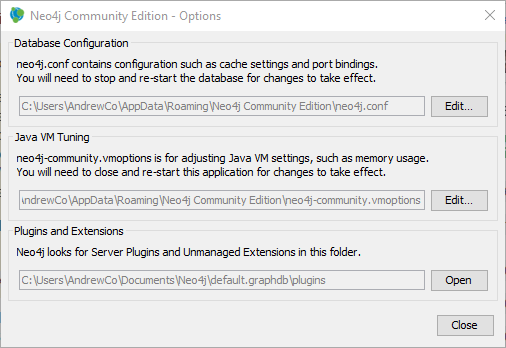
- Press the top Edit button, which will open the
neo4j.conffile in an editor. - Browse to the HTTP Connector section and add a
dbms.connector.http.addressentry.
# HTTP Connector
#
dbms.connector.http.type=HTTP
dbms.connector.http.enabled=true
#
# dbms.connector.http.address=0.0.0.0:#{default.http.port}
dbms.connector.http.address=0.0.0.0:7474
Your server will now be available to other machines via port 7474. From the local machine it’ll still be at http://localhost:7474/.
The above solution works (at least) for Neo4j 3.0.4.