Retail Data: Scraping & API
I’ve been wanting to gather data on retail prices for quite some time. Finally, just before Christmas 2019, I had some time on my hands, so I started to put something together.
The Plan
This was the plan:
- a fleet of scrapers, each focusing on a specific retailer;
- the scrapers submit data to a service which would validate the data and persist in a database; and
- expose the data via a simple REST API.
Implementation
This was the tech stack I envisaged:
I used Scrapy to manage the scraping, via either a Spider, CrawlSpider or SitemapSpider, depending on the site.
The data are pushed into a Celery queue (with a Redis backend), from whence they are processed and entered into the PostgreSQL database.
Environments
I ended up with three environments: development, staging and production.
Development
In the development environment I’ve got both Redis and PostgreSQL running as Docker containers.
Staging & Production
The staging and production environments are on EC2 instances (t3a.medium and t3.large respectively). Both have Redis on Docker. A PostgreSQL database hosted on RDS is accessed from both of these environments. Each environment has a separate dedicated schema, with a shared schema for common (static) data.
The API
Once I had the scrapers up and running, reliably sending data through to the database, it was time to allow access via an API. For this I used Flask and Flask-RESTPlus. This combination had the added advantage of immediately generating a Swagger interface for the API.
This is what the Swagger interface looks like at present.
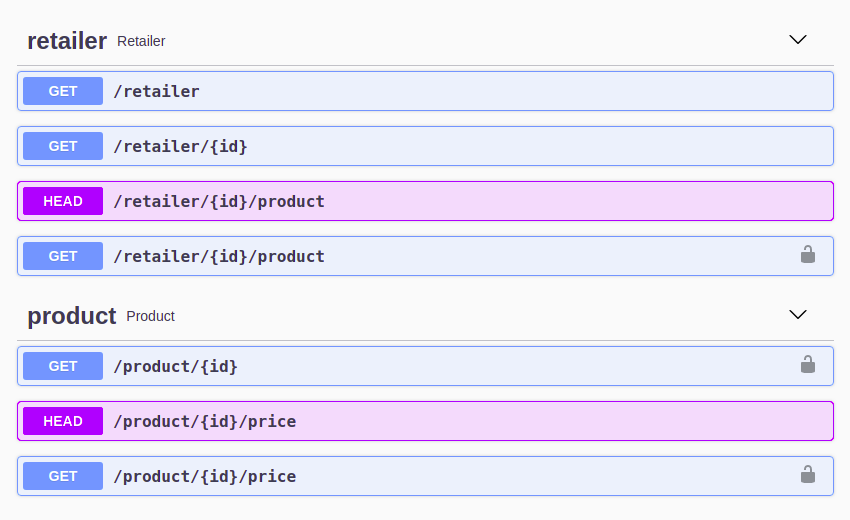
There are endpoints which expose:
- a list of retailers
- a list of products for each retailer and
- historical price information for each product.
An API key is required to access some of these endpoints. Get in touch if you’d like a key.
Here’s data for a specific product:
{
  "id": 349324,
  "retailer_id": 34,
  "url": "https://www.capeunionmart.co.za/tyrell-short-mens",
  "name": "Tyrell Men's Shorts",
  "brand": "Old Khaki",
  "sku": "153048",
  "barcodes": []
}
And the associated price history, showing both normal and promotion prices as well as availability.
[
  {
    "product_id": 349324,
    "time": "2020-03-08T01:22:32+00:00",
    "price": 599,
    "price_promotion": 399,
    "available": true
  },
  {
    "product_id": 349324,
    "time": "2020-02-23T02:16:44+00:00",
    "price": 599,
    "price_promotion": 399,
    "available": true
  },
  {
    "product_id": 349324,
    "time": "2020-02-16T02:25:35+00:00",
    "price": 599,
    "price_promotion": 399,
    "available": true
  },
  {
    "product_id": 349324,
    "time": "2020-02-09T01:47:47+00:00",
    "price": 599,
    "price_promotion": null,
    "available": true
  },
  {
    "product_id": 349324,
    "time": "2020-02-02T02:02:42+00:00",
    "price": 599,
    "price_promotion": null,
    "available": true
  },
  {
    "product_id": 349324,
    "time": "2020-01-26T02:23:15+00:00",
    "price": 599,
    "price_promotion": null,
    "available": true
  }
]
The API is useful. But I do most of my analytical work in R, so it made sense to wrap the API in an R Package. More details on that here.