I keep running into rate limits with my OpenAI and Claude subscriptions. Often that’s just because I’m using the services more often. But the providers are also tightening rate limits and other constraints. Either way, it’s frustrating to have a workflow interrupted.
I could subscribe to more expensive plans, but that’s an extravagant way to solve the problem and it just kicks the can down the road. If the providers tighten limits again later, I end up back in the same place. It makes a local model look less like a novelty and more like a practical solution.
Thanks to model optimization (which increasingly requires less hardware) and tools like Ollama or vLLM, deploying powerful AI on local servers is no longer an engineering nightmare.
Being able to fall back to a local model is going to become an essential safety valve for a number of reasons:
- No rate limits — Go crazy! No throttling or quotas. 🚀 My primary motivation.
- Privacy & data control — Nothing leaves your machine (for sensitive work or simply personal preference).
- No or low cost of inference — Once you’ve acquired suitable hardware. 💸
- Offline access — No internet connection required (for remote travel or air-gapped environments).
- Latency — Lower latency (especially for smaller models or if you have nice kit!).
- Customise — Experiment without restriction. 🛠️ Tweak models on your data. Modify system prompts.
- Experiment — Compare models with reckless abandon. 🔬
Local models look very attractive. Where can I get my hands on them?
What are the options?
Ollama is the most polished and user-friendly local LLM platform, but it’s not the only option. LM Studio is probably the most popular alternative. It has a polished GUI, built-in model browser and an OpenAI-compatible API server. It’s particularly good for non-technical users. Hugging Face also provides an enormous public repository of open-weight AI models. Jan and GPT4All are probably also worth looking at.
A Note on Hardware
The most important factor for running local models is not CPU speed. It’s memory. A dedicated GPU with plenty of VRAM is ideal, since models loaded into VRAM run faster. If you don’t have that much VRAM, there’s a middle ground before resorting to CPU inference. You can use partial GPU offloading, where model layers are streamed to the GPU as needed, but it’s complex to configure and it’ll be slower than having the whole model in VRAM.
If you don’t have a GPU then you can still run local models on a CPU, but you’ll be limited to smaller models and slower inference speeds. More RAM and faster RAM both help though.
Ollama Model Atlas
Before I get into the weeds of working with Ollama I thought it would be a good idea to get a high-level overview of the available models. The model search page is a good starting point, but it can be overwhelming. It’s a bit like a drawer full of cables. Everything is probably useful, but it’s not easy to quickly find what you’re looking for right now!
Model Table
I wanted to create a more compact map of the Ollama model universe. The table below is a snapshot scraped on 30 April 2026. Two columns will benefit from further explanation:
- Size is how much disk space the model file takes up and roughly how much memory (RAM or VRAM) you need to run it. Disk space and memory are closely related because to run a model your system needs to load the whole thing into memory. This is the most important number for whether a model will run on your hardware at all. If you have 16 GB of RAM and the model is 20 GB, then it simply won’t fit. In general smaller models trade quality for size and speed.
- Context is the maximum amount of content (prompt, data, previous responses etc.) the model can handle at once. It’s measured in tokens, where a token is very roughly a word. Context matters in two ways. Firstly, it sets the upper limit on how long a conversation can be before the model starts forgetting the beginning. Secondly, larger context consumes more memory at runtime, even if the model file itself is the same size. So the context isn’t just a feature, it’s also a resource constraint.
There’s also a Cloud column to indicate whether the model is available on Ollama Cloud. This is a separate product that allows you to run models on Ollama’s servers and access them via API. It’s a good option if you want to use larger models without investing in hardware. The Tools column indicates whether the model has tool-calling support.
Use the Search box to filter the table (this will also search by model tags, which are not shown in the table) or use the toggles to sort by any column. Click a row to see the full model details. 🚨 The table only includes library models. There are numerous user-contributed models that are not included.
| Model | Input | Size | Context | Cloud | Tools |
|---|
I have a GPU on my laptop, but it’s not CUDA-capable and can’t be used for inference. So I’m limited to the smaller models. Smaller models can still be remarkably useful. They’re not going to beat the giant models at hard reasoning, but they can make small local workflows feel responsive. Plus they are fast to download, cheap to run and useful for creating a baseline before trying anything larger. They’re also just fun to play with!
Model Distribution
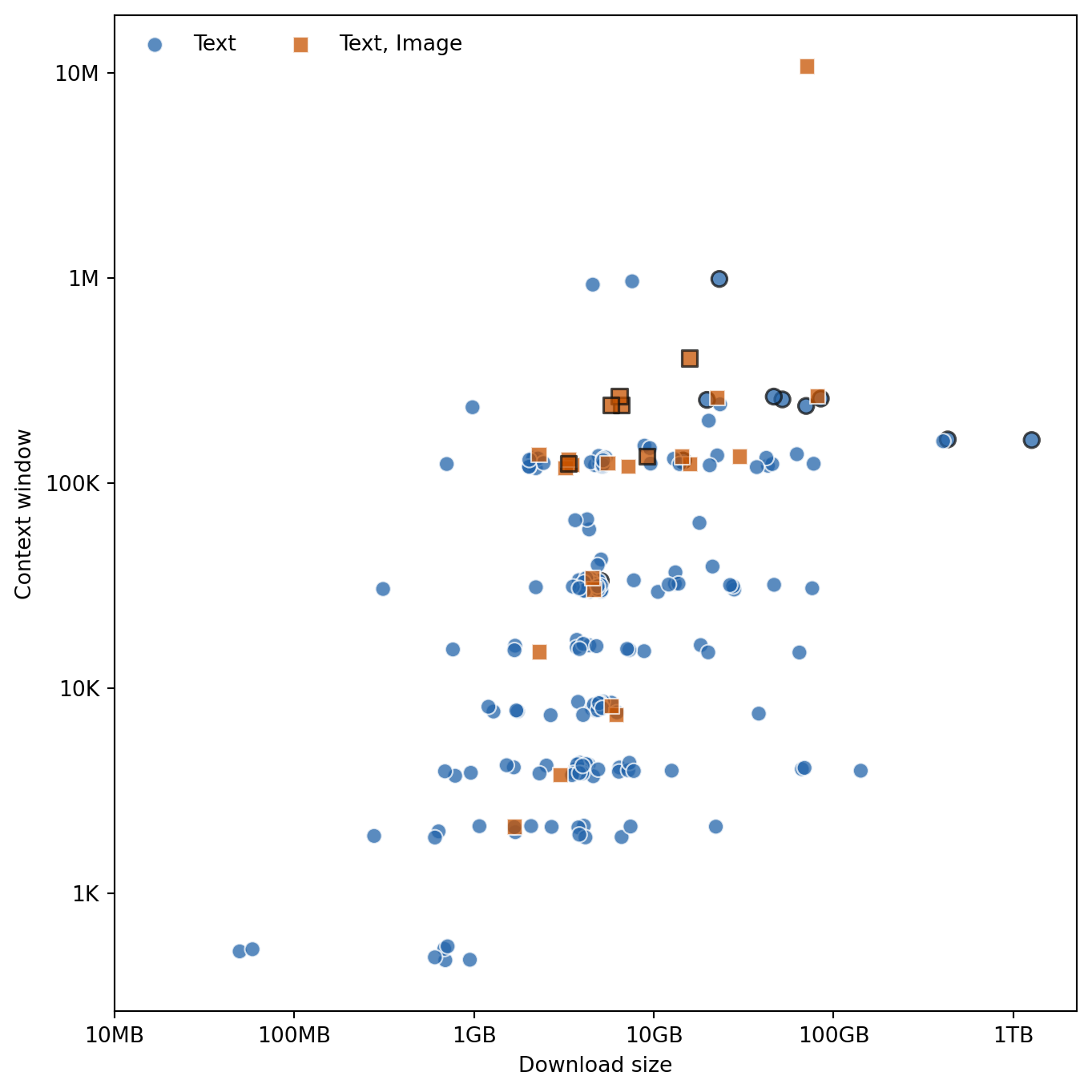
I found the table useful for quickly filtering and sorting the models, but it’s still not ideal for getting a high-level overview. The plot below shows the distribution of model size and context window.
Most models can only handle text input, but there are a few that can also process images. Model size is typically between a few hundred MB and tens of GB, although there are some outliers on either end. Context windows are mostly between a few thousand and a few hundred thousand tokens, with the most common size being 128K. There’s a general tendency for larger models to have larger context windows.
Noteworthy Models
A few models I’ve experimented with that are worth highlighting:
gemma3— A vision model for processing images and documents. Ideal for OCR and image understanding.qwen2.5-coder— A coding model that can handle complex, real-world programming tasks.mistral-small— A general-purpose model suitable for writing tasks.
These might not be immediate replacements for the giant cloud models, but they’re very effective for specific use cases. They’re likely to run well on local hardware and they will save you a load of cloud tokens.
Summary
The Ollama catalogue is wide but navigable once you know your constraints. Most models are text-only, sizes cluster between a few hundred MB and tens of GB, while context windows are typically between a few thousand and a few hundred thousand tokens. Larger models generally come with larger context windows, but also require more memory.
The right model depends on what you’re trying to do and what hardware you have. The table is most useful when you filter with a specific constraint in mind: size, context window or multimodal support. Rather than hunting for one universal best model (there isn’t one), it’s better to narrow your options to two or three reasonable candidates and then test them. A useful tool for checking whether a specific model will fit your hardware is llmfit.