You GET a URL. The server replies with 200 (OK). Your scraper parses the response but finds almost nothing useful. Yet when you open the same URL in a browser the page is packed with content. Products. Prices. Reviews. Tables. What went wrong?
Your scraper’s probably not broken. It’s doing exactly what you told it to do. If you’re using static scraping techniques on a dynamic site, then this is exactly what you should expect. It’s not getting the desired content because that content doesn’t exist in the initial HTML response.
The distinction between static and dynamic websites: where is the content generated?
What does the browser do?
To see why that question matters, compare pages that deliver their content in different ways. Let’s make this concrete using data from three versions of the Quotes to Scrape site, which is part of Zyte’s web scraping sandbox:
Scrape This Site is another web scraping sandbox with a similar range of static and dynamic sites.
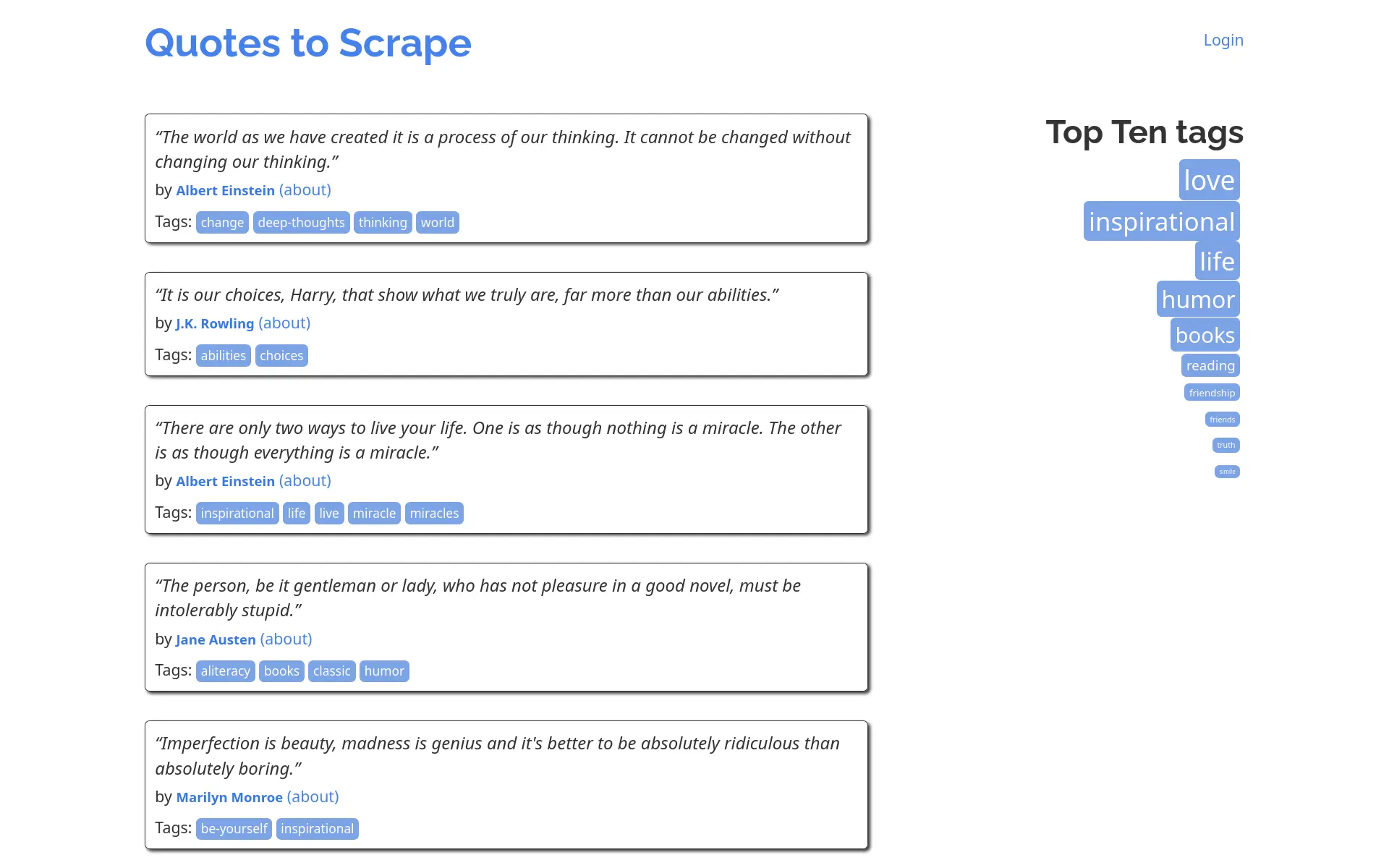
These sites are set up explicitly for web scraping practice, but that doesn’t make them any less real. The underlying mechanics are the same as used by real sites. The approaches to scraping them mirror those applied to real sites too.
The table below summarises the requests made by a browser to render the three sites.
| static | embedded data | infinite scroll | |
|---|---|---|---|
| Quotes | 10 | 10 | 100 |
| Requests | 6 | 7 | 17 |
| Total Size | 73.5 KiB | 104.8 KiB | 117.4 KiB |
| HTML | 1 | 1 | 1 |
| CSS | 3 | 3 | 3 |
| JS | 0 | 1 | 1 |
| Font | 1 | 1 | 1 |
| XHR | 0 | 0 | 10 |
| ICO | 1 | 1 | 1 |
The browser loaded the static version of the site with 6 requests. The HTML payload contained a single page of 10 quotes, each of which was embedded in a separate <div> tag. There were no additional data requests. There were, however, also 3 requests for CSS (Bootstrap, Google Fonts and custom local styling) and an (unsuccessful) request for a favicon. Additional pages of quotes were available via pagination links, each of which required a separate set of requests.
The embedded data version needed 7 requests. The structure of the HTML payload was profoundly different. Rather than a series of <div> tags (one for each quote), there’s a single <script> tag containing a JSON array of quotes, with code to parse the JSON and dynamically insert HTML tags for each quote into the page. In addition to the same CSS and favicon requests, there was also a single request for the jQuery JavaScript library, which is used to manipulate the DOM. Again this is only a single page of quotes and additional pages are available via pagination links.
The infinite scroll version scrolled down until all ten pages of quotes were loaded, giving a total of 100 quotes. Doing this required the browser to make 17 requests. The data for each page (including the first page) is retrieved via AJAX. The HTML payload did not contain any quotes. It simply had the framework of the page and a <script> tag to fetch quotes, convert them to HTML and insert them into the page. It automatically fetched the next page of quotes when the browser scrolled to the bottom of the page, until all pages were loaded.
The request counts are the visible symptoms. To understand why they differ, look at where content enters the page lifecycle.
How does a Website Work?
How does a website work? Superficially simple, but there’s a lot going on between typing a URL and seeing a fully rendered page. If you already know the details (or don’t care), then skip to the next section.
These are the main steps:
- URL entry — Type a URL into the browser, which parses it into its components (protocol, hostname, path and query parameters).
- Cache check — The browser checks its local cache. If it has a fresh, valid copy of the required site, it may serve it immediately and skip many of the remaining steps.
- DNS resolution — The browser checks its own DNS cache, then the OS cache and finally queries a DNS resolver.
- TCP connection (and TLS handshake for HTTPS) — The browser opens a TCP connection to the server. TLS handshake follows for HTTPS. Then HTTP traffic begins.
- HTTP request — The browser sends an HTTP
GETrequest. - Server-side processing — The server assembles a response.
- HTTP response — The server sends the response (HTML body, headers and status code).
- HTML parsing — The browser parses the HTML incrementally as bytes arrive, building the DOM (Document Object Model).
- External resources — As the parser encounters tags that reference external resources (
<link>,<script>,<img>,<iframe>etc.) it dispatches additional HTTP requests. Each resource triggers steps 2 to 7. The process is recursive and requests may be blocking or asynchronous. - CSS parsing
- JavaScript execution
- Render tree construction — The browser combines the DOM and CSS into a render tree, containing the visible elements and their computed styles.
- Layout — The browser calculates the exact position and dimensions of every element in the render tree based on the viewport size, box model and layout rules.
- Paint — The browser splashes pixels onto layers.
- Compositing — Painted layers are assembled into the final image displayed on screen.
- Page loaded — The
loadevent fires once all resources are loaded. JavaScript execution continues.
The page content may be generated at various points in that process: entirely on the server, on the server but delivered as data to be processed in the browser, or entirely in the browser. Where the content is generated determines whether a site is considered static or dynamic.
The terms Server-Side Rendering (SSR) and Client-Side Rendering (CSR) are often used to describe static and dynamic sites respectively.
These terms can be misleading because they suggest a strict dichotomy. In reality, many websites use a combination of SSR and CSR. For example, a site might generate the initial HTML on the server (SSR) but then use JavaScript to fetch additional data and update the page dynamically (CSR). The key distinction is not about where the rendering happens, but rather where the content is generated and how it’s delivered to the browser.
Unfortunately these terms overload the term “rendering”, which is also used to describe the browser’s process of turning HTML and CSS into pixels on screen. I try to think about where the content is generated (server and/or browser) and how it is rendered (only browser). And it’s the generation step that matters here.
This calls for an analogy. Suppose that you want a new bookcase so that you can finally unpack those boxes of books. You have (at least) three options:
- Buy wood, nails and glue. Design, cut and assemble the bookcase yourself.
- Buy a pre-assembled bookcase.
- Buy a flat-pack bookcase and assemble it yourself.
Ignore the first option. The second and third options are analogous to static and dynamic sites respectively.
Static Site
When you buy a pre-assembled bookcase, the supplier creates the finished product and it’s immediately ready to use. You just put it against a wall and start filling it with books. Instant gratification. Zero to low inconvenience. You don’t need to worry about missing parts or confusing instructions. But you might need to get it delivered because it doesn’t fit in your vehicle. And getting it through narrow doorways or up stairs can also be tricky.

A static site generates pages entirely on the server. The response returned to the browser is fully assembled and ready to render. In the simplest case, the server just returns static files from disk. Those files are generated in advance, often during a build step. But this is not the only option. A static site can also generate pages on demand using a server-side application, which typically gathers data from a database to populate a template. For example:
- a blog generated by Jekyll, Hugo, Gatsby or Quarto;
- a documentation site generated by Sphinx or MkDocs; or
- server-side scripting via CGI or PHP.
The key point is that the response contains all of the content you see in the browser encoded as HTML. A static site may still have dynamic features. It may have a search box that queries an API. Or a menu that opens and closes when you click it. But the main content is already there in the HTML response.
A static site is fast, reliable and easy to cache. A static site can still be interactive. However, the content of each page is static. Updating the content requires reloading the page. This can be limiting. Some of the things that can be more challenging to implement on a static site include:
- authentication and user accounts;
- personalisation;
- real-time updates;
- infinite scroll; and
- large volumes of content.
Dynamic Site
A flat-pack bookcase arrives as a box of parts and some cryptic instructions. The supplier fabricates and packages the parts. You do the assembly. A few hours later, if everything goes smoothly, you have a bookcase. Delayed gratification. It’s more work. You need to worry about deciphering the instructions, handling tools and doing the gymnastics required to put the pieces together. But it can be more flexible, and transporting flat-pack is much easier.

A dynamic site shifts some of the page generation work from the server to the browser. The initial response may contain a partially assembled HTML page with JavaScript to complete the process. When the JavaScript runs in the browser it modifies the page content and behaviour. Rather than being delivered as a finished document, the final rendered page is assembled collaboratively by the server and the browser.
JavaScript itself can be delivered in several ways. Small scripts are often embedded directly in the HTML using <script> tags. Larger chunks of code are typically downloaded as one or more separate JavaScript files. When <script> is used to download more code the browser normally stops parsing HTML. Two attributes, async and defer, can modify this behaviour. In both cases the browser continues to parse HTML while downloading the script. However, async scripts are executed as soon as they arrive, while scripts marked defer are executed only after HTML parsing is complete.
JavaScript is often used to retrieve additional data after the initial page has loaded. The browser combines this data with the existing page to update or extend the page content. Additional requests may be triggered by timers, user actions (like scrolling) or changes in application state. Infinite scroll, live search, filtering and interactive dashboards normally use this approach.
The terms AJAX, XHR and Fetch are used interchangeably to describe the process of retrieving additional data after the initial page load, so that the page can then be updated without reloading. They’re clearly related but certainly not the same thing.
AJAX (Asynchronous JavaScript and XML) is the general idea of using JavaScript to make asynchronous requests, allowing the browser to continue working while waiting for a response. XHR and Fetch are implementations of AJAX.
XHR (XML HTTP Request) is the older API. XHR uses an XMLHttpRequest object to send HTTP requests, with callbacks to handle the responses. This architecture can be complicated when dealing with multiple requests or convoluted logic. Callback hell is not just a theoretical problem.
The modern fetch() API is a simpler and more powerful way to make network requests. It handles requests asynchronously (returns promises, integrating with async and await) and supports different response types, with json(), text() and blob() methods for JSON, text and blobs respectively.
Scraping
The three versions of the Quotes to Scrape site have different implementations. It’s not surprising that they require different scraping strategies.
Static
A direct HTTP request for HTML content on a static site is the simplest approach.
GETstatic HTML from https://quotes.toscrape.com/.- Parse the HTML with BeautifulSoup.
- Use CSS to extract the required content.
- Persist to file or database.
- Use CSS to find the pagination link and repeat the process for the next page until there are no more pages.
It’s simple, fast and robust. Provided that you paginate at a reasonable rate you should have no impact on the site and not run into any anti-bot measures.
The main challenge is choosing reliable CSS selectors that will continue to work if the site changes. It’s hard to cater for all potential site changes, but you can make your scraper more durable by avoiding brittle selectors.
Other general points to bear in mind when scraping static sites:
- check for pages that have not changed since last scrape;
- respect
robots.txt; and - use
sitemap.xmlfor easy site navigation (but check that it’s up to date!).
Embedded Data
The second version of the site (https://quotes.toscrape.com/js/) is slightly more challenging. It looks the same in the browser, but the way that it actually works is different. The quotes are embedded in a <script> tag and only converted to HTML by JavaScript running in the browser. This is roughly what this looks like in the HTML:
<script>
    var data = [
        // Quotes data here.
    ];
    // JavaScript code to convert the data to HTML and insert into the page.
</script>
The approach used for the static version will not work. We could use BeautifulSoup to extract the content from the <script> tag. But we’d still need to parse the JavaScript to get the data out. There are two reasonable approaches, both of which are viable for this simple site:
- extract the data from the
<script>tag and parse it directly; or - run the JavaScript (generally via browser automation) and parse the resulting HTML.
If you used httpx.get() to fetch the page and got the content of the <script> tag, then the data could be extracted using a regular expression:
re.search(r"var data = (\[.*?\]);", html, re.DOTALL)If the JavaScript is even moderately complex, then this can be difficult. If the JavaScript processes the data before rendering then this will not work at all.
Sometimes the data is embedded in the page but not in JavaScript code. JSON-LD is a common format for including structured data in web pages.
<script type="application/ld+json">
    // Quotes data here.
</script>
This makes the data easier to extract because you don’t need to worry about JavaScript. The entire content of the <script> tag is JSON.
If you can apply either of these approaches, then you certainly should do! If not then you’ll need to resort to browser automation. Not a train smash. But more complicated and potentially more fragile.
A solution using browser automation might look like this:
- Launch a browser (headless in production or on a remote server).
- Navigate to the site.
- Wait for the page JavaScript to execute and the content to be fully rendered.
- Pull the rendered HTML from the browser.
- Parse the HTML with BeautifulSoup.
- Use CSS to extract the required content.
- Persist to file or database.
- Use browser to navigate to the next page via the pagination link and repeat the process until there are no more pages.
You can also extract the required content directly using browser automation, but I find that a bit clunky. Better to use BeautifulSoup which is optimised for precisely this job.
Dynamic
The third version of the site (https://quotes.toscrape.com/scroll) does not have any data embedded in the HTML payload. It retrieves the data dynamically via AJAX requests. There’s an API request to https://quotes.toscrape.com/api/quotes on loading the page. That pulls down the first batch of quotes. As you scroll down the browser fires events which trigger a callback that requests more data from the API. Requests to the API use a page query parameter to specify which page of quotes to retrieve. The process continues until all pages of quotes are loaded. This is a common pattern for sites with large volumes of content. It allows the site to load quickly and only retrieve additional content when required.
This site can certainly be scraped using browser automation. The algorithm would be similar to that in the previous section, but with an additional loop to scroll to the bottom of the page and wait for new content to load until all content is loaded.
But, given that there’s an API behind the site, there’s a much more effective approach: send requests directly to the API.
- Request the first page of quotes from the API at https://quotes.toscrape.com/api/quotes?page=1.
- Continue requesting subsequent pages until no more quotes are returned.
- Consolidate results and persist to file or database.
With this approach the scraper will retrieve all of the content before persisting. This is reasonable provided that there’s not too much content. If the content is very large, then it may be better to persist the content incrementally as it is loaded.
This approach is simple and robust. If there’s an API behind the site then this is certainly the best way to scrape it. Use the Network tab in your browser’s Developer Tools to identify API endpoints and understand how they work. Filter for XHR requests to quickly identify potential API endpoints.
You might still need to employ some browser automation if, for example, the API requires authentication. But this can generally be done once at the start of the session.
The Practical Rule
Understanding how a website generates content is crucial for effective web scraping. Static and dynamic are useful labels which can help to understand the best approach. The key question is: where is the content generated?
If the server sends finished HTML, parse the HTML. If the page embeds data in a <script> tag, extract that data if you can. If the browser calls an API, call the API directly and behave politely. If the content only exists after JavaScript, authentication, scrolling or state changes, then use browser automation and wait for the content to be fully rendered before parsing the HTML.
Start with the content lifecycle, not the tool. Playwright is excellent when you need a browser, but it is a heavyweight way to fetch JSON. BeautifulSoup is excellent at parsing HTML, but it can’t scrape what was never in the response.
The page you see in a browser is the final arrangement of the bookcase. Your job as a web scraper is to figure out how it got there: did it arrive fully assembled? Or was it delivered as a box of parts with instructions? Once you understand the delivery mechanism, you can choose the right tools and approach to scrape the content effectively.