I’ve taken a look at Byteful’s proxies. After pushing a few thousand requests through their proxies I like what I see: broad geographic coverage via credible consumer networks and low observed latency.
Product Overview
Byteful offers four proxy classes:
For the purpose of this post I’ll be focusing on residential proxies, since these are the most useful for web scraping. I’ll also take a look at Smartpath, Byteful’s intelligent routing feature that can automatically route requests through datacentre or ISP proxies when a residential exit isn’t needed.
TipStatic ISP vs Residential Proxies
Static ISP and residential proxies both look like legitimate residential IPs, but differ in architecture and performance.
Static ISP proxies are hosted on high-performance datacentre servers but use IP addresses issued by residential ISPs. It’s a hybrid that delivers a residential reputation with datacentre speed, stability and bandwidth.
Residential proxies are the real deal, routing traffic through actual residential devices. They’re also slower, with higher latency and have inconsistent availability.
Getting Started
Go to Byteful.
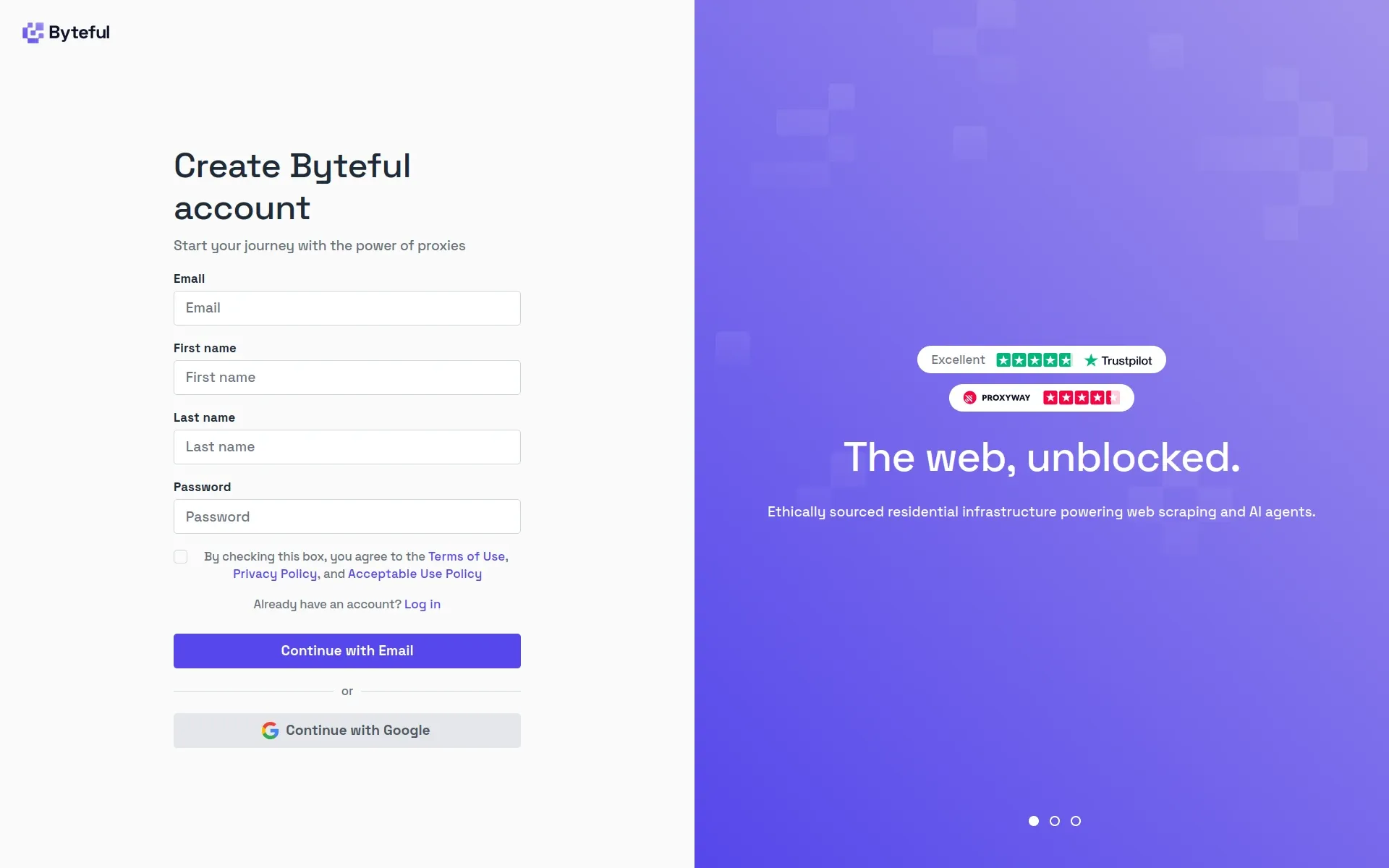
Sign up for an account and log in. There’s a 1 GB free trial which is only accessible once you’ve created an account.
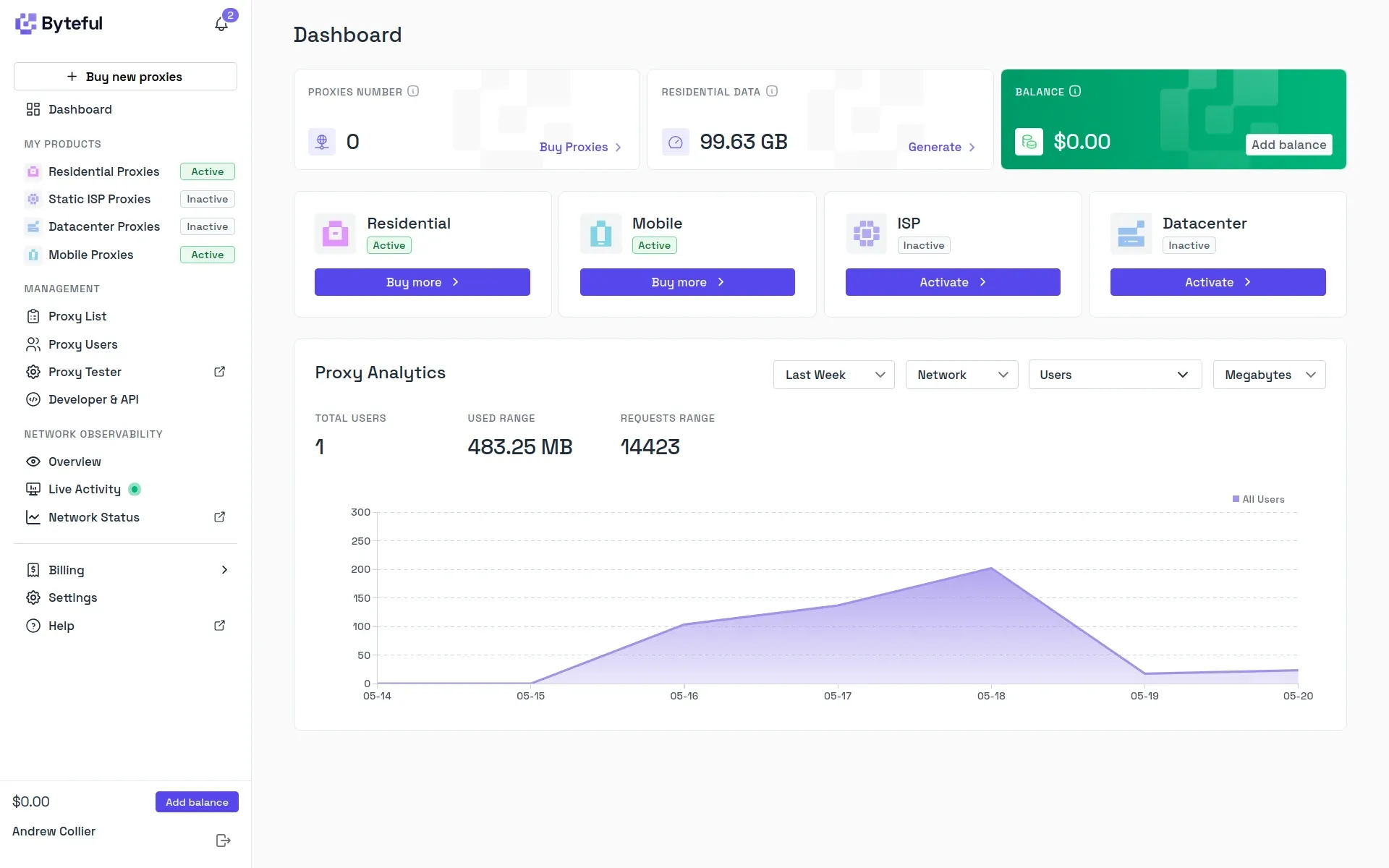
After signing up you’ll see a Residential Free Trial button on your dashboard. Click through on that to activate.
Dashboard
The account dashboard gives you access to all of your account features. It shows which services you’re subscribed to (residential and mobile proxies in my case), account balances and usage analytics.
Clicking on the Residential Proxies menu item takes you to the residential proxy dashboard. This shows usage specific to this component of your account and instructions on how to integrate the proxies with various clients.
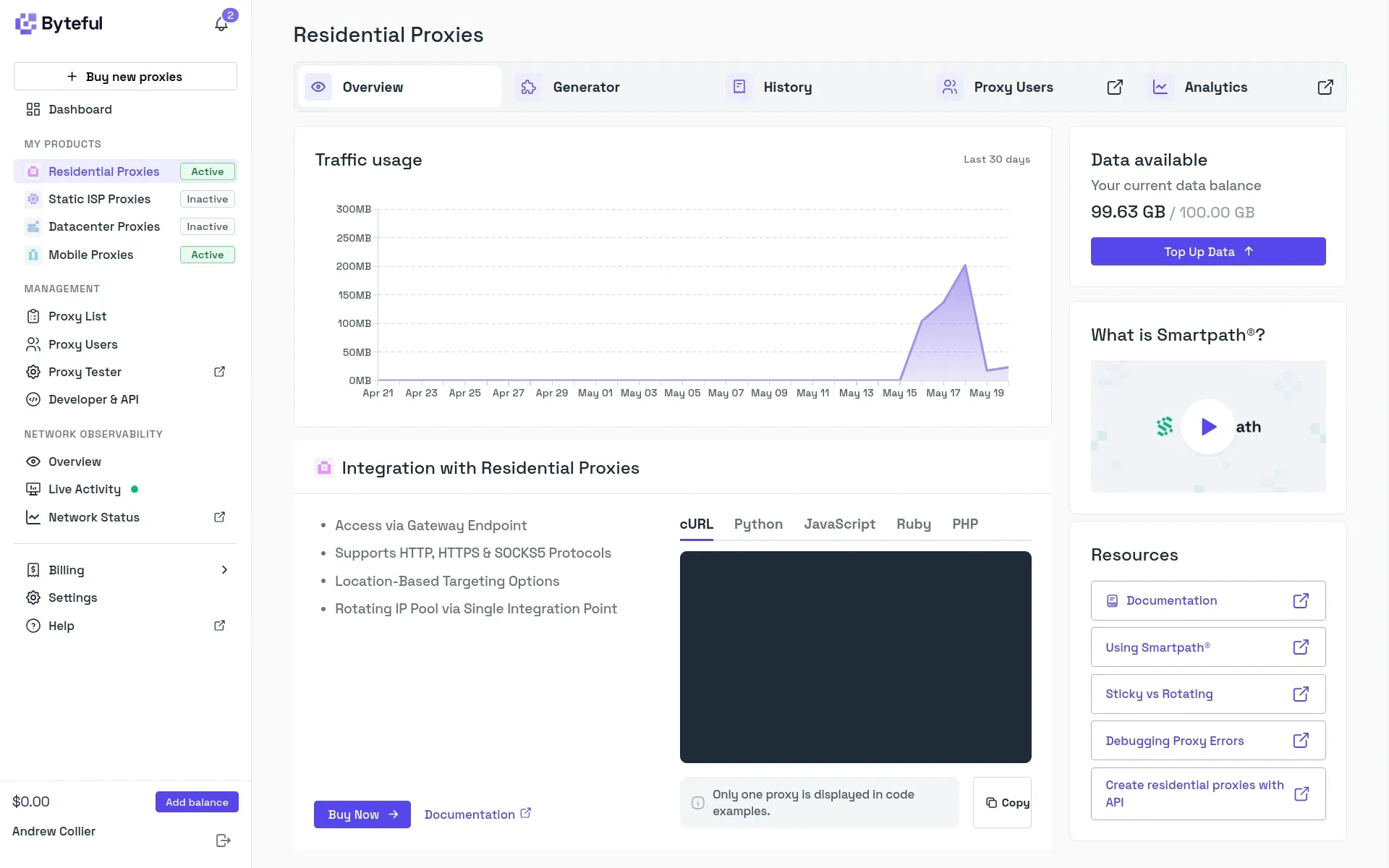
However, for the purpose of using the proxies it’d be a mistake to stop here. Click through to the Generator.
Proxy Generator
The proxy generator helps to make sense of the available options. You can choose proxy type (rotating or sticky), protocol, geographic targeting and whether or not to use Smartpath (more on that later!).
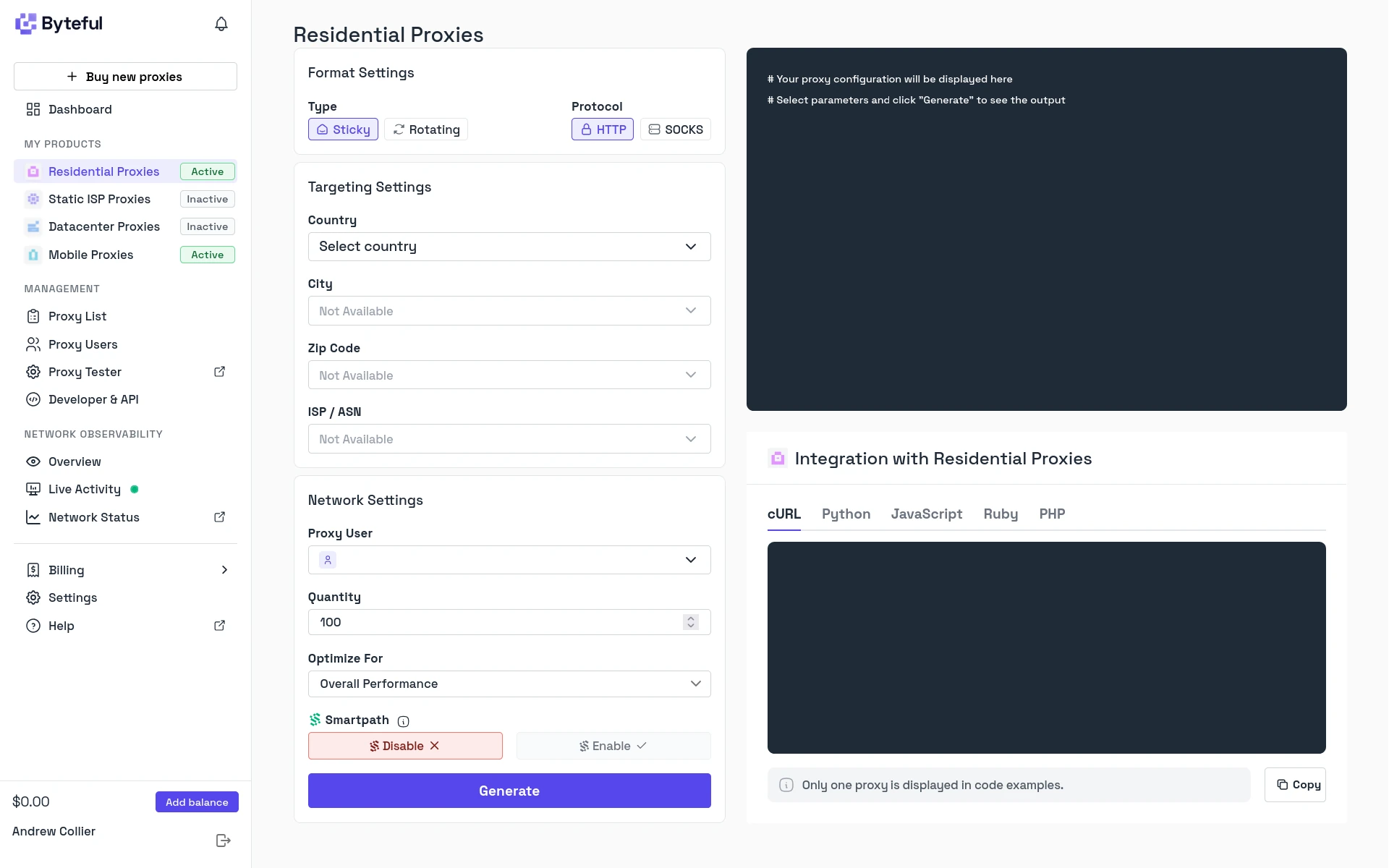
Based on your chosen configuration, it then provides proxy credentials and endpoint details:
- proxy host (for example
residential.byteful.comormobile.byteful.com) - proxy port
- username and
- password.
Most of the settings are encoded in the username, which is a composable string that controls how your request is routed through Byteful’s infrastructure. For example (using ****** as a placeholder for an account-specific prefix):
******— rotating residential proxy (base username);******_s_VAE0BZ7LJ3XHV9IN— sticky session with specific session ID;******_smartpath— residential proxy using Smartpath;******_m_speed— optimising for speed; and******_c_gb— residential proxy with country targeting for the UK.
You can generate multiple proxy configurations at once using the Quantity field. These will differ by the proxy port and session ID (if you’re using sticky sessions).
Observability Overview
The observability overview helps to monitor usage.
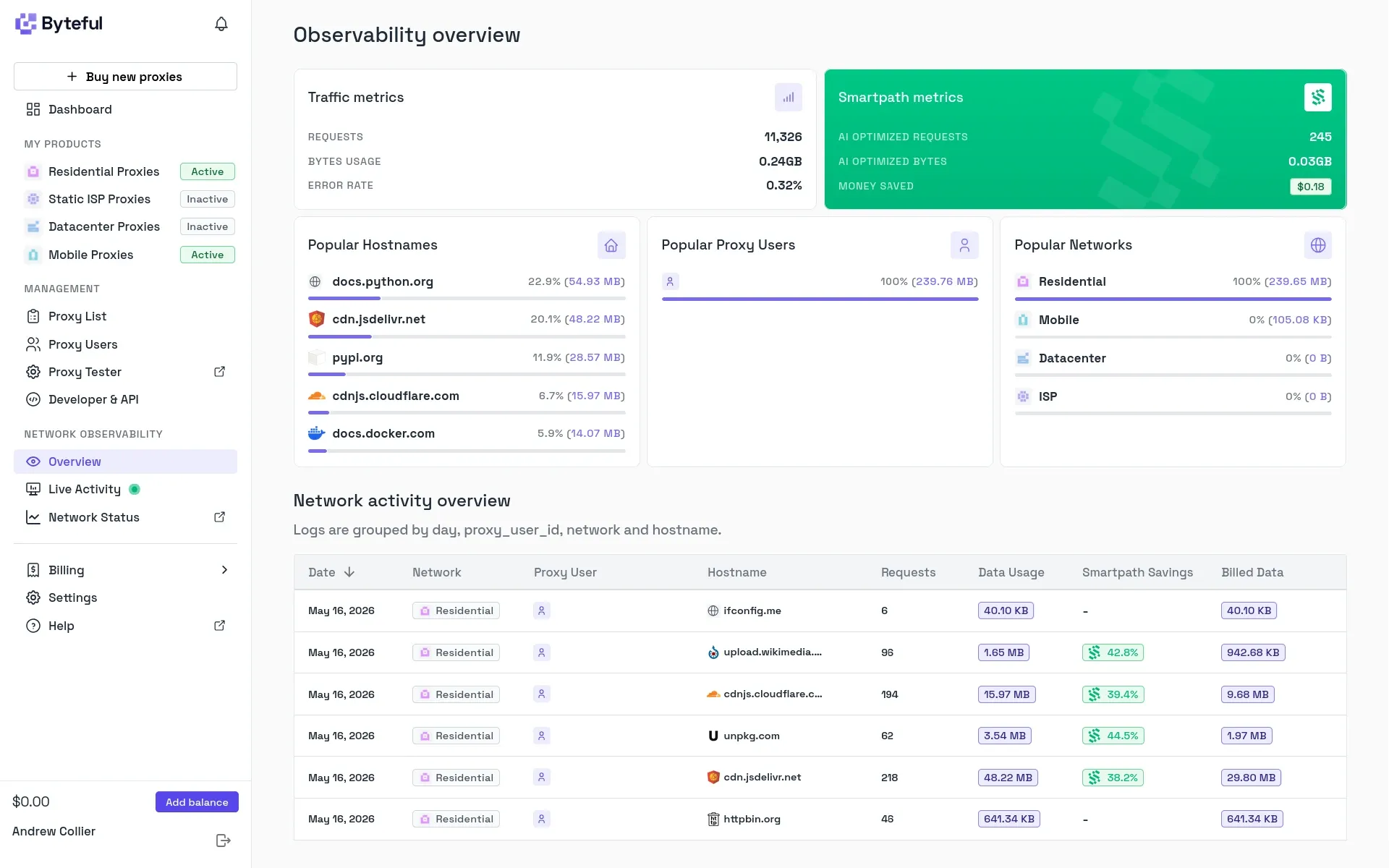
The network activity table shows a breakdown of requests grouped by date and target domain, with the number of requests, total response bandwidth and an indication of whether or not Smartpath optimisation was applied.
Live Activity
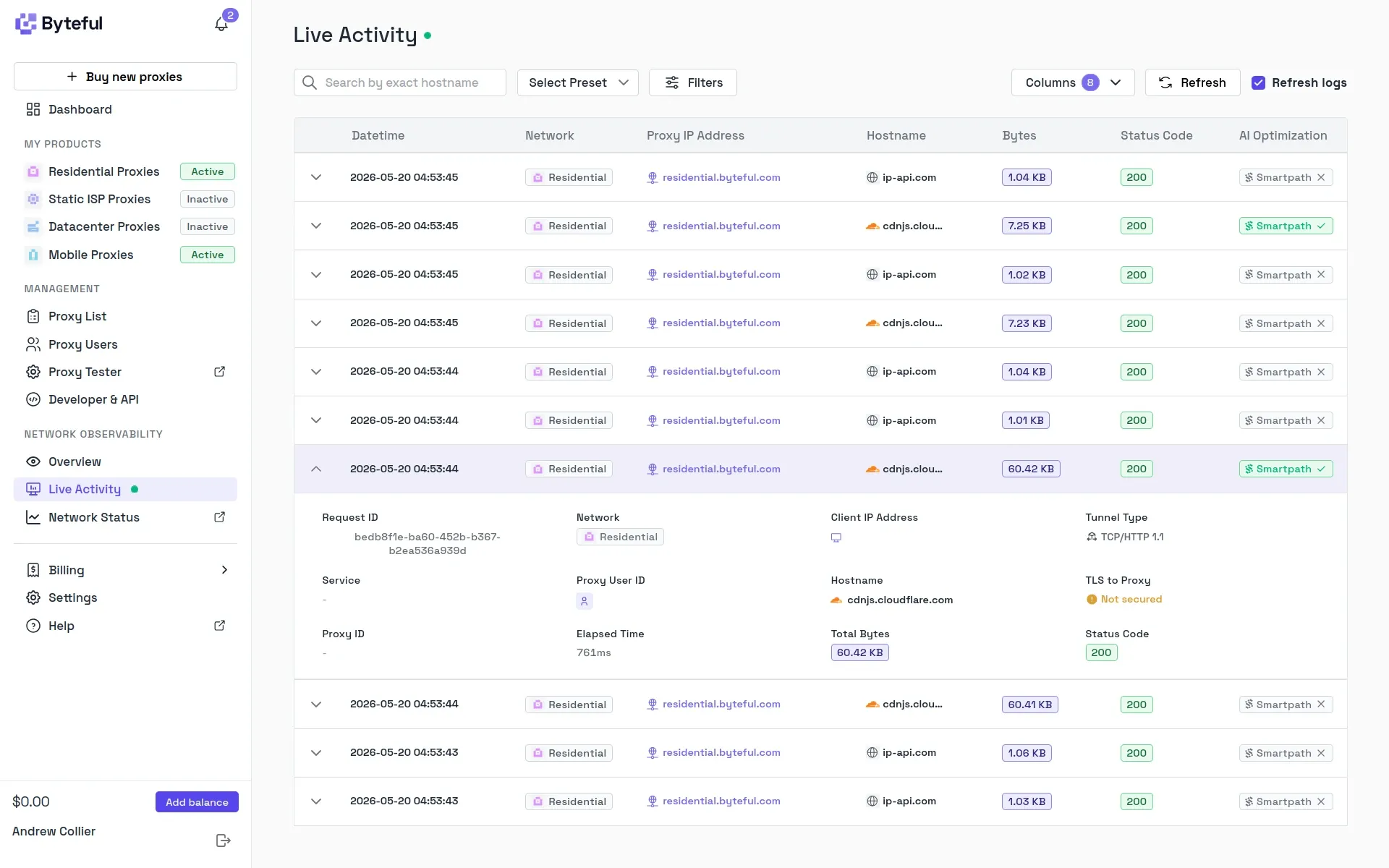
If you want something more granular then the live activity feed shows each individual request as it happens, including which proxy endpoint it was routed through and how much data was sent and received. Each request has a unique request ID which can be used to correlate with logs or query specific proxy behaviour.
Residential Proxy Performance
I want to evaluate the residential proxies on two key dimensions:
- What’s the geographic distribution of the observed exit IPs?
- How much latency does the proxy add versus a direct request?
Geographic Distribution
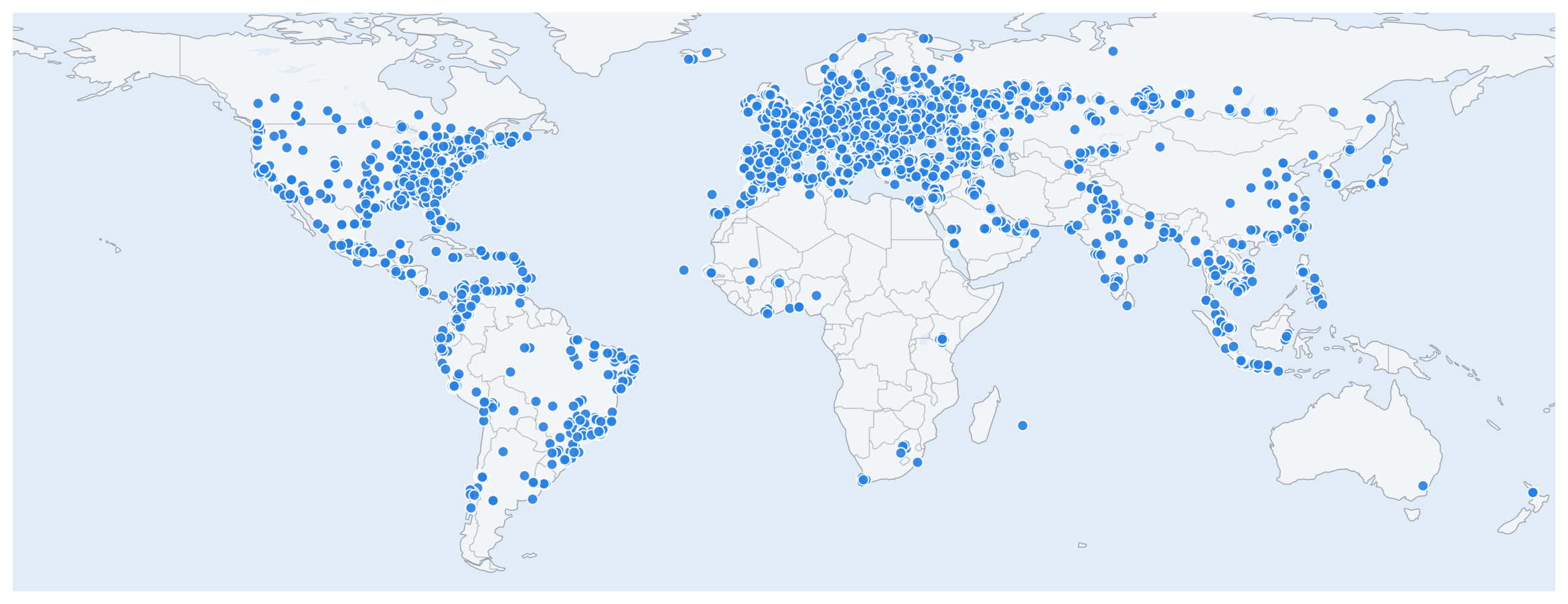
I used the Byteful proxy to gather responses from 5,000 requests to http://ip-api.com. The responses include country, city, postal code and coordinates for the observed proxy exit IP. Those responses are recorded in a JSONL file.
The requests were routed through 4,984 distinct exit IPs spanning 130 countries. North America and Europe are the densest parts of the sample, but there are also numerous locations in South America and Asia, with a smattering in Africa and Oceania too.
The table below compares the geographic distribution of Byteful’s exit points to those of Geonode and Massive from previous posts. The methodology is consistent, so the numbers are comparable.
| Geonode | Massive | Byteful | |
|---|---|---|---|
| IPs | 4,945 | 4,877 | 4,984 |
| Countries | 114 | 69 | 130 |
| Cities | 1,866 | 2,203 | 2,544 |
| Postal Codes | 2,232 | 3,422 | 3,145 |
Byteful’s residential pool has good geographic dispersion, with more distinct exit IPs, countries and cities than the other two providers. Massive has more distinct postal codes. However, this distinction should be interpreted with caution because postal code information was unavailable for many IP addresses, either due to limitations of the geolocation database or the absence of postal code data for various countries. It’s not clear whether more distinct postal codes is a sign of better geographic dispersion or just better postal code coverage in the underlying geolocation data. Counts of distinct cities and countries are a stronger signal of geographic dispersion, since city and country data is consistently available across all records.
Residential Locations
Are the exit IPs actually residential? It’s difficult to make a definitive conclusion based on the geolocation data alone. However, there are a couple of proxy measures that are at least indicative:
- Are exit IPs spread across cities and postal codes within each country?
- Do the reported ISPs look like consumer access networks rather than cloud hosts?
The sample spans 2,544 distinct country-city combinations and 3,145 distinct country-postal code combinations. Postal codes are present on about 86.1% of records, which is enough to make the postal code dispersion meaningful rather than decorative.
The bigger national samples look especially healthy when city and postal code coverage are considered together:
- United States has 513 (66.8%) distinct cities and 685 (89.2%) distinct postal codes from 768 exits;
- United Kingdom has 221 (46.7%) distinct cities and 345 (72.9%) distinct postal codes from 473 exits;
- Spain has 183 (56.8%) distinct cities and 258 (80.1%) distinct postal codes from 322 exits; and
- Germany has 85 (65.4%) distinct cities and 117 (90.0%) distinct postal codes from 130 exits.
Postal codes are not available for every IP address and some countries report them more consistently than others, so city counts are a more reliable signal. Still, the two measures point in the same direction: the exits are scattered across many locations rather than repeatedly cycling through a compact set of datacentre endpoints.
ISP labels are another useful smell test. The dominant ISPs, Comcast Cable (193), Charter (130), Virgin Media (114), SFR (109) and AT&T (91), are all recognisable consumer providers.
These simple checks make the network look credibly residential.
Direct Versus Proxy Timing
To assess the impact on response times I also collected timing data for 5,000 matched pairs of requests to 25 distinct URLs across 14 domains. Each URL was requested once directly and once through the Byteful proxy, with both requests sent in rapid succession. The results are recorded in a JSONL file.
Proxied requests are slower because they have to take the scenic route. Direct requests had a median latency of 29 ms, while the proxied requests had a median latency of 645 ms. That works out to a slowdown ratio of around 20.8x, which appears alarming at first. However, the slowdown ratio isn’t a very useful statistic because the effect of the proxy is additive rather than multiplicative. The proxy overhead (proxy time minus direct time) is more meaningful. The plot below shows the proxy overhead against the direct time for each request, with both axes on a logarithmic scale. The horizontal dashed line indicates the median proxy overhead of 594 ms.
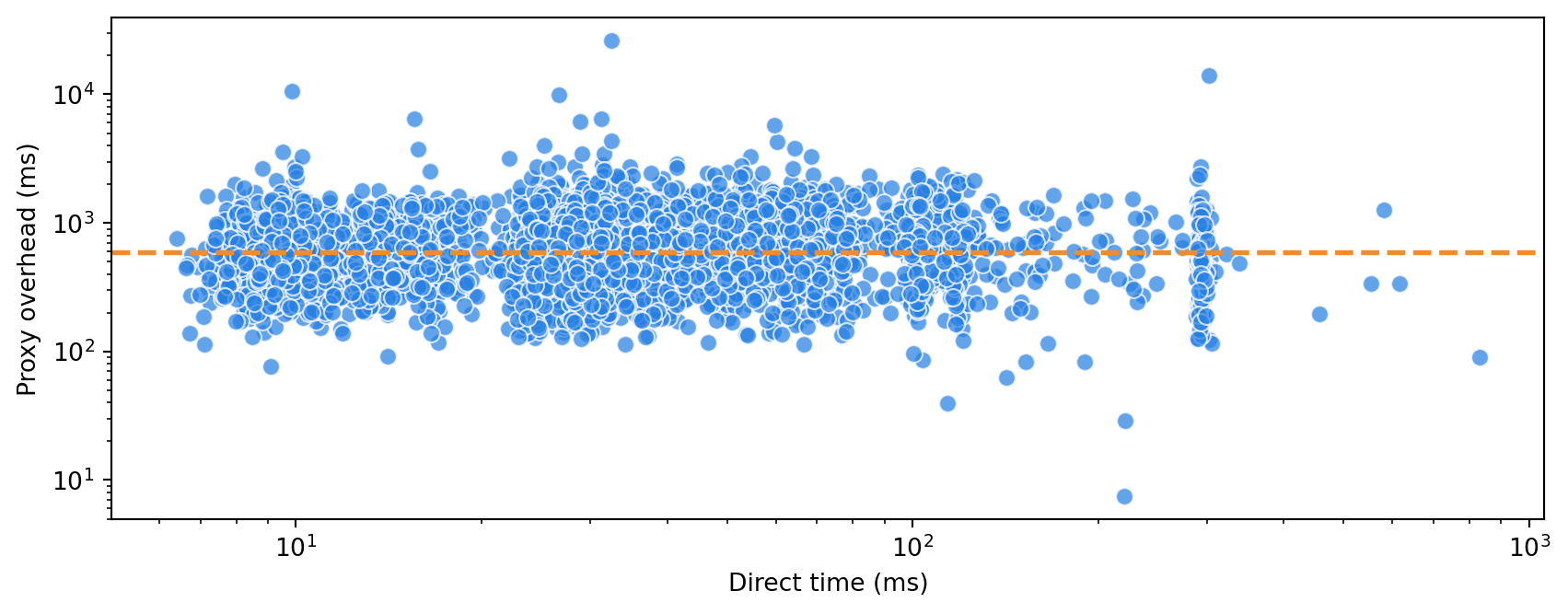
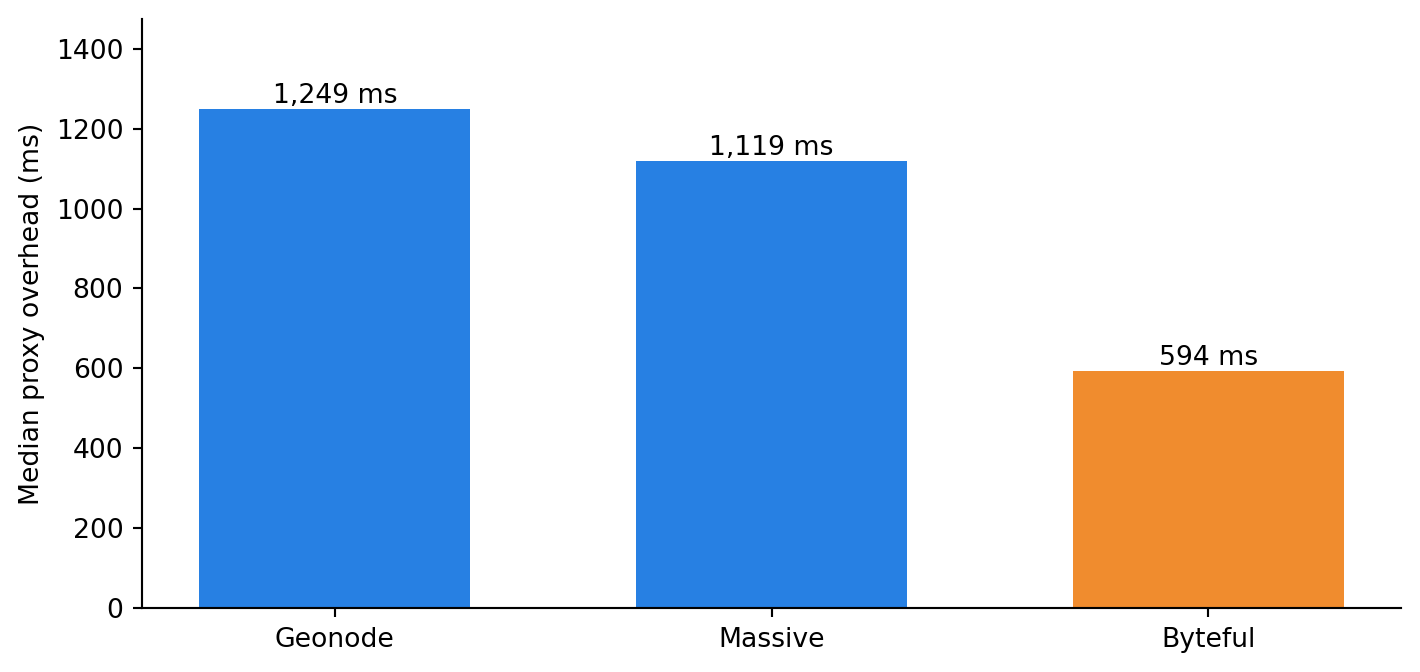
The proxy added about 711 ms on average and 594 ms at the median to the direct request time. The observed overhead for the Byteful proxy is less than I found previously for Massive and Geonode.
Smartpath
You probably don’t need a residential IP for every request. For example, if you’re using a browser through the proxy, then the initial request to the target domain may need a residential IP, but subsequent requests to fetch resources from CDNs probably don’t. Using a residential proxy for those requests is wasteful when a more economical datacentre or ISP proxy would suffice.
Intelligent Routing
Instead of sending every request through a residential IP, Smartpath makes quick (under 10 ms) routing decisions for each request. If a residential exit isn’t needed, then it routes the request through a datacentre or ISP proxy instead at no extra cost.
Smartpath appears to be most useful when routing browser traffic, since a browser will typically send a mix of requests to the target domain and third-party CDNs. Smartpath can route the CDN requests through datacentre or ISP paths while keeping the target-domain requests on residential exits. In my experience, web scraping projects normally have well-defined target URLs, making it relatively simple to know in advance which will require a residential proxy and which won’t. Smartpath offers limited utility in this case. For interactive browsing or browser-automated scraping, though, automating this routing decision is handy!
Observability
You can track the impact of Smartpath via the observability overview and live activity dashboards. The overview dashboard summarises the number of requests that were optimised and the associated savings, both in terms of bandwidth and cost. In my testing the savings were typically around 40%. The live activity dashboard shows individual requests, with a column indicating whether or not Smartpath optimisation was applied.
Testing Smartpath
I tested Smartpath with URLs for a selection of domains and found that CDNs (like jsDelivr, Cloudflare, Google Fonts and Wikimedia) often benefited from Smartpath optimisation, while non-CDN domains generally didn’t. This makes sense because CDNs generally serve static resources that don’t require residential IPs to access.
NoteX-Served-By Header for Routing Insight
To test Smartpath I used the --verbose and --dump-header arguments to curl, which gave me access to detailed request, routing and response information.
I paid particular attention to the X-Served-By header which is used by some CDNs to identify the cache servers involved in serving a request. It’s not a standard HTTP header and isn’t present on every response. The values are provider-specific, but they generally look something like cache-fra-eddf8230142-FRA or cache-pdk-kfty8610033-PDK. The middle portion identifies a particular cache node. The short suffixes, such as FRA, PAR, NRT, LHR and PDK, are location hints used by the CDN.
Here’s an example of one of those tests: I made two requests for the same URL, one using a plain residential proxy and the other with Smartpath enabled. The first was routed through a residential exit in Michigan (US). The second went through the AS398465 ASN which belongs to Rackdog, a US-based hosting and server provider. Definitely not a residential exit, but the request still succeeded and the response was identical to the one from the residential exit.
Another example. The residential request went through an IP in Centre-Val de Loire (France). The request optimised by Smartpath was routed through the AS11426 ASN belonging to Charter Communications, a US cable ISP.
Those examples illustrate the typical behaviour of Smartpath. If a request can be routed through a datacentre or ISP proxy without breaking the target response, then Smartpath will do so. Routing decisions are not deterministic because they depend on the current network conditions and the Smartpath model’s assessment of the request.
Smartpath is effective because anti-bot measures are normally focused on the target domain. A request for a page on that target domain might need to come from a residential IP because that’s where the site is making anti-bot decisions. But the same page may also load JavaScript, CSS, fonts and images from third-party CDNs. Those CDN requests are outside the target site’s anti-bot layer and often just fetch static files that are readily accessible. A datacentre or ISP exit that’d be flagged for the target domain can be perfectly adequate for the supporting assets.
Verdict
Byteful’s residential proxy service performs well. The exit locations have good geographic distribution and IPs associated with consumer access providers. Byteful’s latency overhead is also lower than other residential proxy services I’ve tested.
Smartpath is a useful cost reduction feature for optimising proxy traffic, with sensible routing decisions and clear observability. For web scraping, where I already know which URLs need a residential identity and which ones don’t, I’m less excited. In that case explicit routing is cleaner. But for browsing and browser automation, Smartpath hits the spot.